Google Business Profile 2026: A Step by Step Guide to Help SMEs Show Up on Google Maps and Attract Customers Automatically
Your customers’ first impression of your business isn’t your website, it’s your Google Business Profile (GBP): the card with your name, hours, photos, and reviews that appears on Google Maps and search results.
If that profile is incomplete or untouched, you’re quietly sending customers to your competitors every day. The good news? Fixing it doesn’t take a big budget or tech skills.
This guide walks you through 8 practical steps to optimize your GBP in 2026 so more people find you, and more of them actually reach out.

Why Google Business Profile Is the “Heart” of Local SEO in 2026
When someone searches “dentist near me” or “best coffee shop open now”, Google shows a box at the top of the page with a map and 3 business listings called the Local Pack. That’s prime real estate, and your GBP is the key to getting there.
Beyond that, more customers are now getting your phone number, hours, and address directly from Google without ever visiting your website. This is called a zero click search, and it’s becoming the norm.
In 2026, Google’s AI also pulls data from GBPs to answer local search queries. A well optimized profile means more chances to appear in those AI generated results for free.
The 8 Steps Checklist: How to Optimize Your Google Business Profile in 2026
Step 1: Claim, Verify, and Keep Your NAP Consistent
Go to business.google.com, find your business, and claim it. Then verify via Google’s process (postcard, phone, or video).
Once in, make sure your NAP is accurate everywhere:
- Name: Your real business name. No keyword stuffing.
- Address: Exact format, matching your website and other directories.
- Phone: Same number across all platforms.
Also running on Apple Maps? Make sure NAP matches there too. See our Apple Maps guide
Step 2: Choose the Right Business Category
Your primary category is one of the biggest local ranking factors and most businesses get it wrong.
- Be specific: “Italian Restaurant” beats “Restaurant”
- Check what your top ranking competitors are using
- Add secondary categories for other services you offer
Step 3: Write a Business Description That Works for Both Customers and Google
You have 750 characters. Use them to explain what you do, who you serve, and what makes you different with your keywords woven in naturally.
Example:
“We help busy professionals recover from pain and get back to the activities they love. Our licensed physiotherapists offer same day appointments and personalized recovery plans right here in [City Name].”
Avoid promotional phrases like “Best in town!” and never include URLs or phone numbers in the description.
Step 4: Upload the Right Photos and Videos
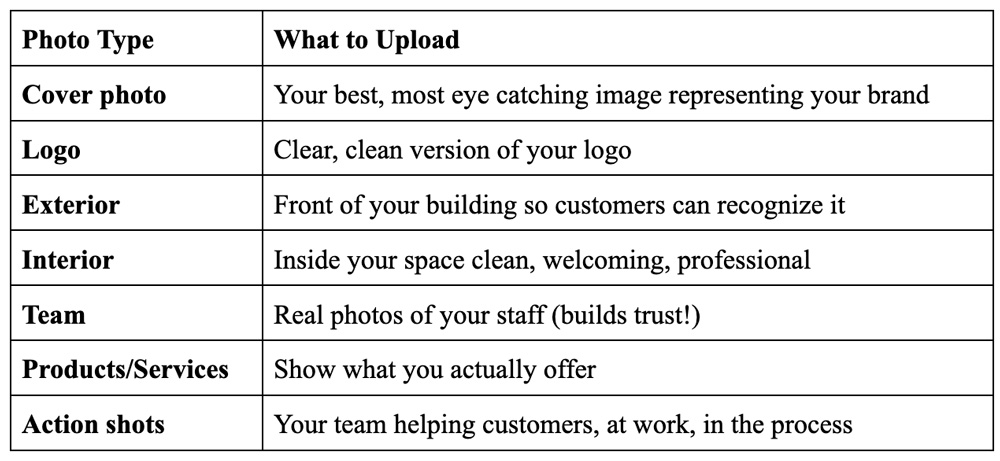
Video tips:
- Keep videos under 30 seconds
- Show your space, your team, or a quick “behind the scenes” moment
- Good lighting matters more than a fancy camera
SEO Hack: Before uploading, rename your image files. Instead of IMG_1234.jpg, use best-coffee-shop-irvine.jpg or plumber-repairing-sink-chicago.jpg. Google reads file names. This takes 10 seconds and most businesses never bother.
Need help building a consistent visual brand?
Step 5: Add Your Products and Services
List each service or product separately with a short description and price range if possible. Customers can see what you offer before clicking anything which means fewer time wasting calls and more qualified leads.
For service based businesses:
- List each service separately (e.g., “Teeth Whitening,” “Dental Implants,” “Emergency Dental Care”)
- Write a 1–2 sentence description for each
- Add a price range if you can
For product based businesses:
- Upload photos of key products with prices
- Group by category if possible
Step 6: Build a Review Strategy
Reviews are one of the most powerful trust signals for local businesses. Don’t wait for them to show up actively.
Script (text or email, within 24 hours):
“Hi [Name], thanks for choosing [Business]! If you’re happy with your experience, a quick Google review would really help us: [link]. No pressure at all!”
Replying to 5 star reviews include your service + city:
“Thank you so much, [Name]! We’re glad you had a great experience with our [service, e.g., roof repair] team here in [City Name]. See you again soon!”
Replying to 1 star reviews stay calm, go offline:
“Hi [Name], we’re sorry this wasn’t the experience we aim to deliver. Please reach out at [email/phone] so we can make it right.”
Never pay for fake reviews. Google is getting better at detecting them and a suspended profile means zero visibility.
Step 7: Post Regular Updates
Treat your GBP like a mini social media channel. Post offers, new services, events, or recent blog articles.
Aim for 1–2 posts per week. While Google no longer auto deletes posts after 7 days, older posts get pushed down. Consistently adding fresh updates signals to Google (and customers) that your business is active which can positively affect your local rankings.
Just published a new blog post? Share it as a GBP update to drive extra traffic. See why every business should have a blog
Step 8: Turn On Messaging and Set Up Q&A
Messaging: Enable it and set a quick auto reply so no one feels ignored.
“Thanks for reaching out! We’ll get back to you within [X hours].”
Q&A: Don’t leave this section to chance anyone can post answers, including wrong ones. Ask and answer your top 5–8 customer questions yourself. Google’s AI can pull these answers directly into search results.
Advanced Tips for 2026
- Voice Search: Use natural, conversational language in your description and Q&A many local searches happen while driving.
- Multiple Locations: Each location needs its own fully optimized GBP. Don’t copy paste.
- Holiday Hours: Update them before every public holiday. A customer who drives to a closed store is a one star review waiting to happen.
3 Mistakes That Can Get Your Profile Penalized
Keyword stuffing in your business name “Joe’s Pizza | Best Pizza in Chicago | Delivery” violates Google’s guidelines. Use your real business name only.
Creating duplicate listings Multiple profiles for the same location can get your profile merged, removed, or penalized.
The “set it and forget it” mindset Outdated hours, old photos, and no recent posts signal to Google that your business is inactive. Block out 30 minutes a month to review and refresh your profile.
Optimizing your GBP comes down to eight things: claiming and verifying your profile, picking the right category, writing a strong description, uploading quality photos, listing your services, collecting and responding to reviews, posting regular updates, and turning on messaging. You don’t have to do it all at once even knocking out the first three steps today puts you ahead of most local businesses.
Want More Local Customers Without Doing It All Yourself?
At Graphicwise, we help SMEs build a complete Local SEO and Google Marketing strategy so your business doesn’t just show up on the map, it stands out.
Contact us for a free Local SEO consultation
Serving clients across the globe.